> For the complete documentation index, see [llms.txt](https://bizachi-dev.gitbook.io/bullethell-elemental-template/llms.txt). Markdown versions of documentation pages are available by appending `.md` to page URLs; this page is available as [Markdown](https://bizachi-dev.gitbook.io/bullethell-elemental-template/user-interface-menus/home-scene.md).
# Home Scene
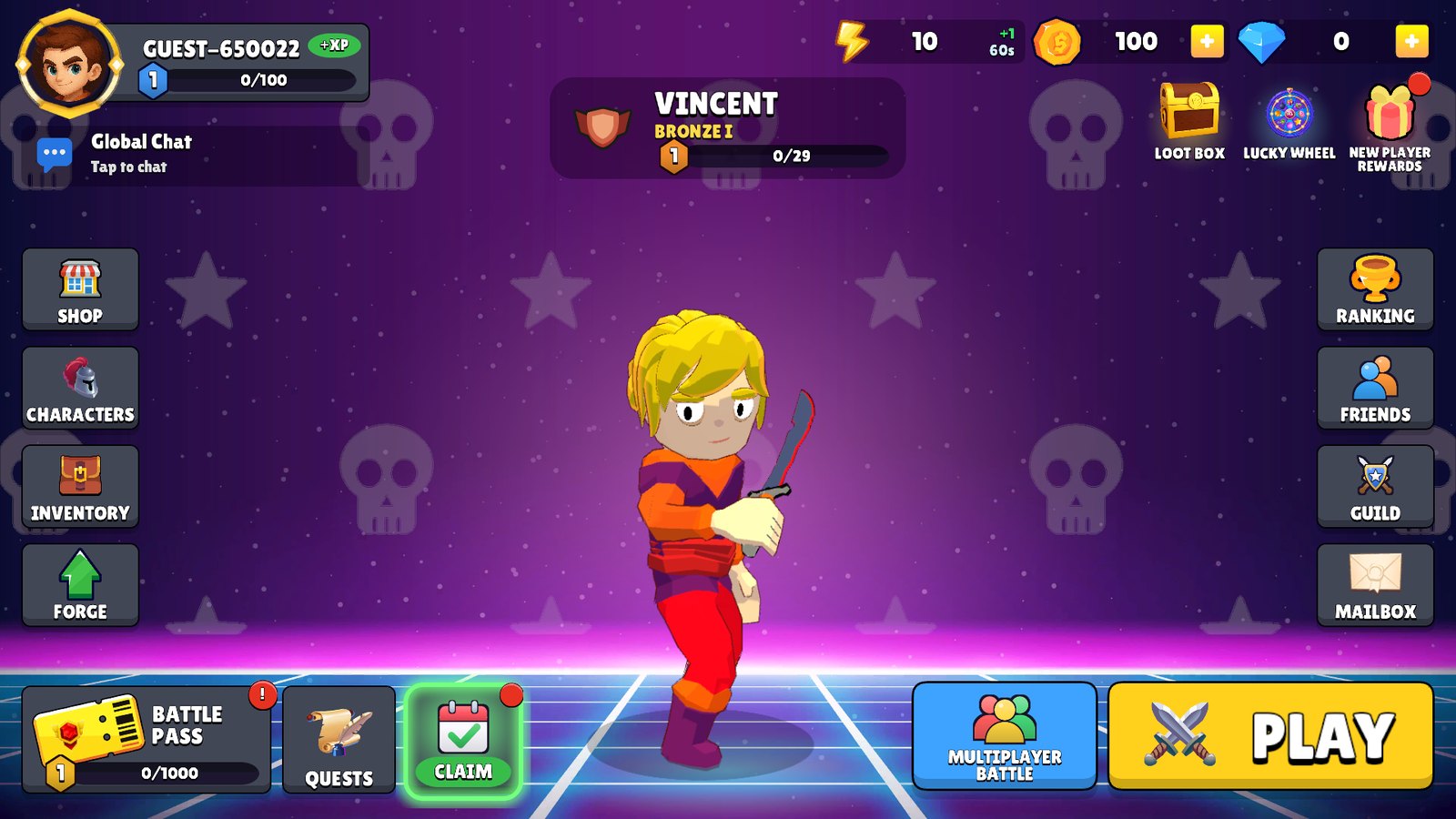
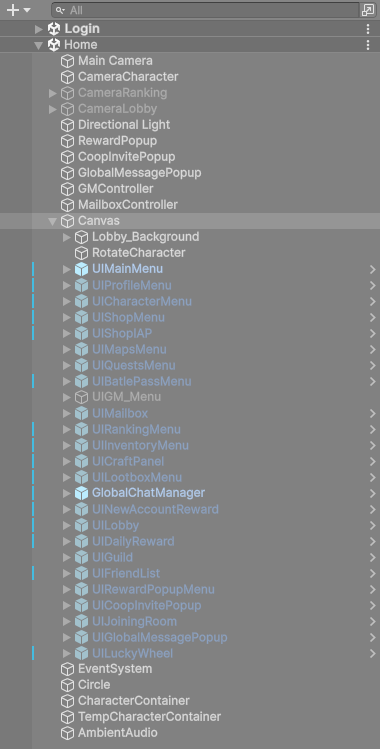
The main menu of the game. Every screen (characters, shop, maps, quests, battle pass, ranking, profile and more) is a prefab under its Canvas.
`BulletHellTemplate/Res/Scenes/Home.unity` is loaded after the login. It has no managers of its own: GameInstance, BackendManager, LoadingManager, AudioManager, LanguageManager and the Photon lobby come from the Login scene.
***
### 1. Scene objects
| Object | What it is |
| ------------------------------------------------------------ | ---------------------------------------------------------------------------------------------------------------------------------------------------------------- |
| **Main Camera** | Draws the UI. |
| **CameraCharacter** | Draws the selected character into a render texture (`Res/RenderTextures/FullHDMainMenu`) shown behind the main menu, in the character screen and in the profile. |
| **CameraRanking** | Draws the favourite character of the player selected in the ranking. Turned on by the ranking screen. |
| **CameraLobby** | Draws the characters of the players in a co-op or PvP party. |
| **CharacterContainer / TempCharacterContainer** | Parents of the 3D models shown by those cameras. |
| **Canvas** | Every menu screen (table below). |
| **RewardPopup**, **CoopInvitePopup**, **GlobalMessagePopup** | Popups for pending rewards, co-op invites from friends and global messages from a GM. |
| **GMController**, **MailboxController** | GM panel logic and the mailbox badge. |
| **AmbientAudio** | Music of the Home scene (Scene Ambient Audio). |
***
### 2. How the screens open and close
Every screen starts **inactive**. The buttons of **UIMainMenu** simply activate them (`GameObject.SetActive(true)` in the button's On Click), and each screen closes itself with its Back or Home button. There is no menu manager to register a new screen in.
| UIMainMenu button | Opens |
| ----------------------------------------- | --------------------------------------------------------------- |
| Profile card / profile icon | UIProfileMenu |
| Characters | UICharacterMenu |
| Shop, gold `+` | UIShopMenu |
| Diamond `+` | UIShopIAP |
| Play | UIMapsMenu |
| Multiplayer | UILobby |
| Quests | UIQuestsMenu |
| Battle Pass | UIBattlePassMenu |
| Ranking | UIRankingMenu |
| Inventory, Forge, Mailbox, Guild, Friends | UIInventoryMenu, UICraftPanel, UIMailbox, UIGuild, UIFriendList |
| Daily reward, New player reward | UIDailyReward, UINewAccountReward |
| Lucky Wheel, Loot Box | The screens of the paid addons, when installed |
| ADM Panel | UIGM\_Menu (only visible for support and GM accounts) |
{% hint style="warning" %}
These button targets are set in the Home scene, not in the prefabs. If you drop the UIMainMenu prefab into another scene, its buttons open nothing until you wire them again.
{% endhint %}
#### Hide Behind Menus
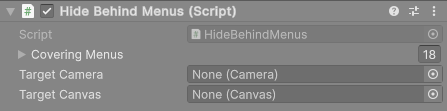
Full-screen menus cover the main menu completely, but Unity would keep drawing the main menu and the 3D character behind them. The **Hide Behind Menus** component pauses them while a covering menu is open, which saves a lot of rendering on mobile. It is used on three objects:
| Object | What it pauses |
| ----------------- | -------------------- |
| UIMainMenu | Its Canvas |
| Lobby\_Background | Its Canvas |
| CameraCharacter | The character camera |
| Field | What it does |
| ------------------ | -------------------------------------------------------------------------------------- |
| **Covering Menus** | Screens that cover this object. While any of them is open, the target is switched off. |
| **Target Camera** | Camera to pause. Empty uses the Camera on the same object. |
| **Target Canvas** | Canvas to hide. Empty uses the Canvas on the same object. |
{% hint style="info" %}
When you add a new full-screen screen to Home, add it to **Covering Menus** on all three objects. The exception: a screen that **shows** the character render texture (like the character and profile screens) must stay out of the list of **CameraCharacter**, or the character disappears from that screen.
{% endhint %}
***
### 3. The screens
All screen prefabs are in `BulletHellTemplate/Core/UIElements` (the daily rewards, inventory and crafting screens are in their folders under `Addons`). Edit the prefab, not the scene instance, so your changes are kept when you use the screen elsewhere.
**UIMainMenu.** Player card (name, icon, frame, account level), selected character with its level and mastery, battle pass progress, daily reward countdown, currency bar and the badges (quests to claim, friend requests). It refreshes by itself when the backend undoes a change.
**UICharacterMenu.** The character list (only unlocked characters) with filters and sorting, and the details panel: stats, skills, skins, level up, favourite, equipped items and runes, and stat upgrades. The texts of the stats and messages are in **Ui Translations**.
**UIProfileMenu.** Player card, favourite character showcase, account stats, icon and frame customization, name change (rules and price come from the [Game Instance](/bullethell-elemental-template/user-interface-menus/game-instance.md)), coupon codes, volume sliders and logout. The Player Id row is hidden on the Offline backend.
**UIShopMenu.** Items sold for soft currency, taken from **Game Instance > Shop Data**. Category tabs (characters, icons, frames, items, currency packs), slot sub-tabs for items (armor, head, pants, shoes, runes), a featured card with the rarest offer and a buy popup. See [Create New ShopItem](/bullethell-elemental-template/scriptables/create-new-shopitem.md).
**UIShopIAP.** Real-money packs from **IAP Manager > Purchasable Items**. It shows the store price, a bonus chip and the best-value pack, and blocks the screen until the store answers. See [IAP Manager](/bullethell-elemental-template/user-interface-menus/iap-manager.md).
**UIMapsMenu.** Standard maps in the order of **Game Instance > Map Info Data** (clearing one unlocks the next) and event maps, shown only while an event is active on the backend. Turn on **Always Show Event Map** to list every event map for testing.
**UIQuestsMenu.** Quests from **Game Instance > Quest Data**, claimable ones first. **Hide Completed Quests** hides the finished one-time quests.
**UIBattlePassMenu.** The pass track, premium purchase and Claim All. See [Create New BattlePassItem](/bullethell-elemental-template/scriptables/create-new-battlepassitem.md).
**UIRankingMenu.** Top players (by monsters defeated) and top guilds (by guild points).
| Field | Default | What it does |
| ---------------------------- | ------- | -------------------------------------------------- |
| **Ranking Size** | 20 | How many players or guilds are listed. |
| **Refresh Cooldown Seconds** | 60 | Minimum time between two downloads of the ranking. |
| **Show Guild Ranking** | On | Shows the Guilds tab on backends with guilds. |
The Offline backend has no ranking: the screen shows an "online only" message.
***
### 4. Texts and translations
Most screens have a **Labels** or **Static Texts** section. Each label has a default text and a list of translations (**Language Id** + text). Change the words there instead of editing the TextMeshPro components, or your text is replaced when the language changes. Labels with `{0}` receive a value, for example `Lv {0}`.
### 5. Sprite atlases
Each screen packs its own art in a Sprite Atlas next to it (for example `Res/UI/Shop/Atlas_shop` packs `Res/UI/Shop/Art`). Put new art for a screen in its `Art` folder and it is packed automatically. Keeping each screen's art in one atlas keeps the draw calls low.
***
### Before you release
{% hint style="danger" %}
The template has test buttons that give XP for free: **+XP** on the player card (UIMainMenu), **Test Add Exp** and **Test Add Mastery** in the character details (UICharacterMenu) and **+XP** on the season card (UIBattlePassMenu). They work on every backend. Delete them or turn them off before you publish your game.
{% endhint %}